CleanShot X is Mac-only · ScreenCandy is iOS & Android

CleanShot X for your phone

CleanShot X runs only on macOS. There is no iPhone or Android version of it, and ScreenCandy is not a drop-in replacement. It is the phone app for the part you miss most on a phone: making a screenshot presentable, marked up and safe to post.

Free on the App Store and Google Play.

The honest answer

There is no drop-in CleanShot X for mobile — including this one

What CleanShot X does that ScreenCandy does not

CleanShot X is a desktop capture suite, and most of what it does depends on being a Mac app sitting in front of a Mac screen. ScreenCandy does not try to replace any of this.

Screen recordingNot in ScreenCandy
Scrolling captureNot in ScreenCandy
OCR text grabNot in ScreenCandy
Cloud upload and share linksNot in ScreenCandy
Taking the capture itselfYour phone does that
Desktop hotkeys and pinned overlaysNot in ScreenCandy

What ScreenCandy does where CleanShot X cannot run

Phone screenshots are the ones that never get tidied up, because tidying them up means moving the file to a desktop first. ScreenCandy starts from the share sheet on the phone that took the screenshot.

Runs oniPhone and Android
Opens fromThe share sheet
Backgrounds30 built-in looks
Markup11 CandyMark tools
RedactionBlur or pixelate, flattened
ProcessingOn-device, no account
Side by side

The two apps, compared plainly

CleanShot X

A capture-and-share suite for macOS. Nothing here runs on a phone.

PlatformmacOS only
Takes the captureYes
Scrolling captureYes
Screen recordingYes
Backgrounds and framingYes
AnnotationYes
Cloud share linksYes

ScreenCandy

A compose, mark up and redact app for the screenshot already on your phone.

PlatformiOS and Android
Takes the captureNo — your phone does
Scrolling captureNo
Screen recordingNo
Backgrounds and framing30 looks, 6 modes
Annotation11 tools
Cloud share linksNo — nothing is uploaded
On the phone

What ScreenCandy gives a phone screenshot

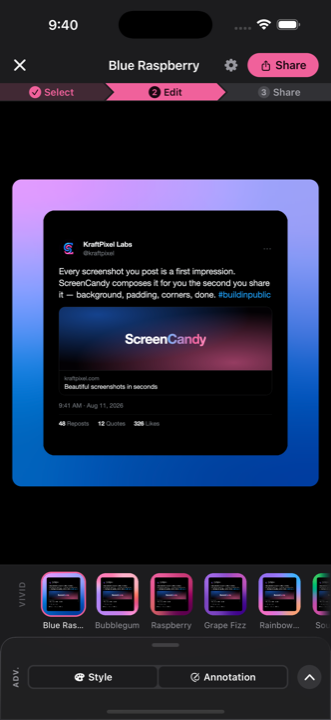
A background, instantly

30 built-in looks — 24 mesh gradients across vivid, warm, cool, night and neutral, plus 6 classics — and six background modes, including the screenshot blurred behind itself and a fully transparent ground.

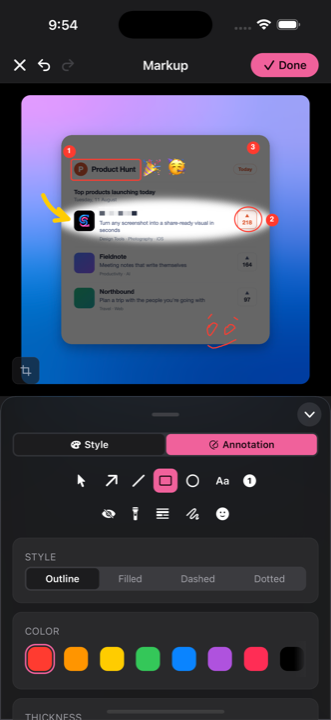
CandyMark tools marking up a screenshot with an arrow and numbered counters

Markup that survives export

Eleven CandyMark tools: arrows, numbered counters, highlight, spotlight, emoji, text and blur or pixelate redaction. Preview and export render from one Skia scene, so what you see is what the file contains.

A screenshot composed in the ScreenCandy editor, sized for the canvas it is going to

Sized for where it is going

Nine aspect ratios plus named canvases for Instagram, LinkedIn, Product Hunt, Reddit and X, or a custom size from 16 to 12000px. Export PNG, JPEG or WebP at 1x, 2x or a custom scale.

Stay with CleanShot X when

You are working at a Mac and need the capture itself

Screen recording, scrolling capture, OCR and shareable cloud links are the reasons people buy CleanShot X, and ScreenCandy has none of them. If that is the job, nothing on a phone replaces it.

Reach for ScreenCandy when

The screenshot is already on your phone

Take the screenshot, tap Share, tap ScreenCandy, and it opens already composed. Mark it up, blur the parts that should not be public, and post it — without an account, an upload, or a trip through a desktop.

The phone half of the job,
done on the phone.

Free on iOS and Android. Nothing leaves your device — no account, no upload, no analytics.

Get ScreenCandy